The Loop Readiness Review
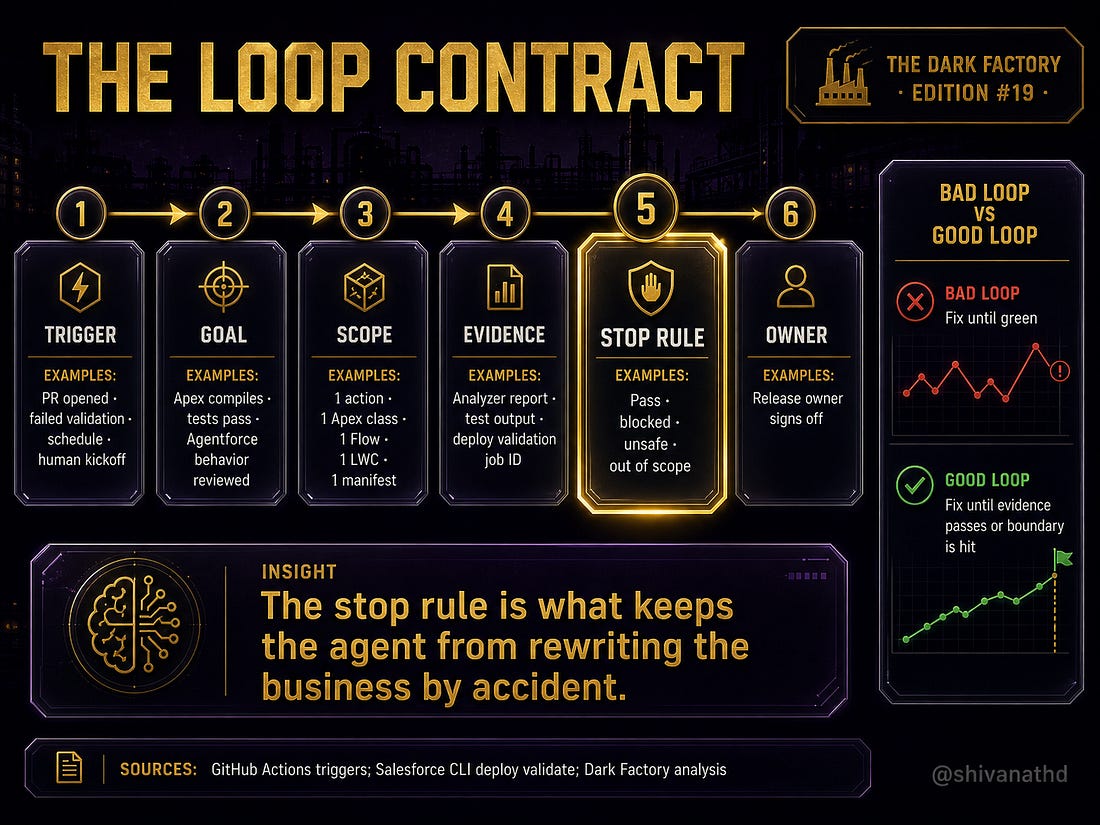
The loop is not useful because it can keep asking an agent to work. It is useful when the loop has a trigger, scope, evidence path, stop rule, and owner.

The LinkedIn version made the public argument: loop engineering is not a prompting trick. For Salesforce teams, it is release control.
The subscriber question is more practical.
Before a team lets Cursor, Claude Code, and Agentforce participate in real delivery, what should leaders inspect?
The answer is not another tool list.
It is a review ritual.
Call it the Loop Readiness Review.
The purpose is simple: prove that the loop can work inside a bounded Salesforce release path before it starts changing code, metadata, permissions, or Agentforce behavior.
The Problem
Salesforce work has never been only code.
That is why loop engineering gets dangerous if it is imported from generic software engineering without translation. A loop that works cleanly in a small TypeScript service can fail quietly in Salesforce because the repo is only one part of the system.
The real system includes Apex, Lightning Web Components, Flow, permission sets, profiles, custom metadata, deployment manifests, package versions, sandbox drift, and production release rules.
Agentforce adds another layer. Salesforce describes Agentforce DX as extending Salesforce DX to work with agents, and says agents are metadata like other Salesforce customizations.
https://developer.salesforce.com/docs/ai/agentforce/guide/agent-dx.html
That means agent behavior enters the same release conversation as Apex and Flow. If an Agentforce action calls Apex, launches a Flow, uses a prompt template, or changes how a support rep escalates a renewal risk, the loop is no longer just a coding loop.
It is a business-behavior loop.
The Review Ritual
Run the Loop Readiness Review before a loop is allowed to operate on a Salesforce branch or sandbox.
The review has five questions.
1. Is The Loop Bounded?
A bounded loop has a trigger, a scope, and a no-touch list.
Good trigger examples:
A pull request opens.
A deployment validation fails.
A scheduled sandbox drift check runs.
A human release owner starts a specific inspection.
Bad trigger example:
"Improve the renewal process."
That instruction gives the agent permission to wander. In Salesforce, wandering is expensive. It can turn a small Apex fix into Flow edits, profile changes, and metadata churn nobody asked for.
The no-touch list matters as much as the scope. If the loop can edit profiles, broad Flow metadata, package boundaries, or production-connected assumptions without review, the loop is not ready.
2. Is The Evidence Real?
Anthropic's agent guidance makes the control point clear: agents need ground truth from the environment at each step, and stopping conditions help maintain control.
https://www.anthropic.com/engineering/building-effective-agents
In Salesforce, ground truth is not a model's confidence.
It is command output, analyzer output, test output, deployment validation, retrieved metadata, and human review notes.
For an Agentforce escalation action, the evidence packet should include:
Changed-component map.
Salesforce Code Analyzer output.
Apex test output.
LWC test output when relevant.
`sf project deploy validate` result.
Agentforce metadata notes.
Behavior-review script for the business owner.
Salesforce Code Analyzer gives the loop a static inspection layer across engines such as CPD, ESLint, Flow Scanner, PMD, RetireJS, Regex, and Salesforce Graph Engine.
https://developer.salesforce.com/docs/platform/salesforce-code-analyzer/guide/engines.html
Salesforce CLI deployment validation gives the loop a release-shaped check instead of a local-only check.
https://github.com/salesforcecli/cli
3. Is Org State Represented?
This is the Salesforce trap.
The repository may look clean while the org is not.
A Flow can exist in UAT and not in source. A permission set can be missing field access. A managed package version can differ. A prompt template can be connected to an Agentforce action in one sandbox and not another. A test can pass locally while deployment validation fails because the target org has different constraints.
The loop needs a rule for org-state failures.
It should not automatically keep editing.
It should classify the failure:
Code issue inside scope: fix and rerun.
Metadata missing from source: stop and report retrieval need.
Permission ambiguity: stop and route to admin.
Package or org dependency: stop and route to architect or release manager.
Business-rule ambiguity: stop and route to business owner.
The loop earns trust by stopping at the right boundary.
Not by pretending every failure is code.
4. Is Agentforce Behavior Reviewed?
Agentforce actions are building blocks that let agents perform tasks and interact with data. Salesforce documents custom action paths through Apex, Flow, prompt templates, Apex REST actions, AuraEnabled actions, and named query actions.
https://developer.salesforce.com/docs/ai/agentforce/guide/get-started-actions.html
https://developer.salesforce.com/docs/ai/agentforce/guide/agent-invocablemethod.html
That means a loop can validate code and still miss the business consequence.
The Apex compiles.
The Flow deploys.
The metadata moves.
The agent still routes the wrong renewal risk to the wrong team.
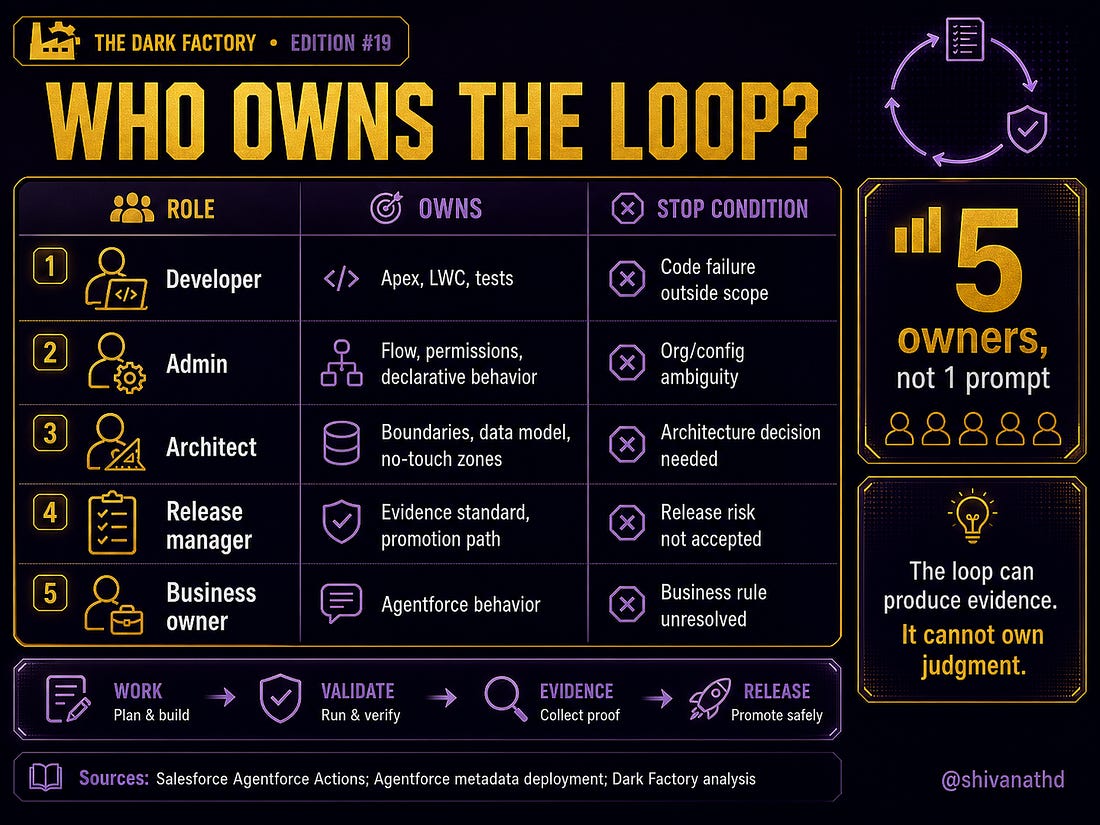
That is why the business owner owns behavior review. The loop can prepare the review script:
What should the agent detect?
What action should it call?
What record should change?
What should the user see?
When should the agent escalate to a human?
But the loop cannot approve the business meaning.
5. Is There A Stop Condition?
The most important line in any loop is not the first prompt.
It is the stop rule.
Stop when validation passes.
Stop when the iteration budget is reached.
Stop when the loop detects missing source.
Stop when a permission decision is needed.
Stop when the action changes customer or employee behavior.
Stop when the loop is about to touch a no-touch area.
Claude Code and Cursor make the work surface faster. Claude Code can run commands, inspect output, and continue through terminal feedback. Cursor can help engineers reason across files and encode project rules.
https://code.claude.com/docs/en/overview
https://docs.cursor.com/agent
https://docs.cursor.com/context/rules
That speed is useful only when the stop rule is visible.
What To Inspect Next
Run this review on one bounded Salesforce change before scaling it:
Pick one Agentforce action or Apex/LWC change.
Write the loop trigger.
Write the exact success condition.
Write the no-touch list.
Write the evidence packet.
Write the stop conditions.
Assign the five owners: developer, admin, architect, release manager, business owner.
Then run the loop in a sandbox and inspect the evidence, not the vibe.
The point is not to slow the team down.
It is to make AI speed legible enough to release.
Loop engineering will become a real Salesforce skill when teams stop asking whether the agent can make the change and start asking whether the loop can prove the change is ready.
That is the operating shift.
Sources
Anthropic, Building Effective Agents: https://www.anthropic.com/engineering/building-effective-agents
Claude Code overview: https://code.claude.com/docs/en/overview
Cursor Agent: https://docs.cursor.com/agent
Cursor Rules: https://docs.cursor.com/context/rules
Salesforce Agentforce DX: https://developer.salesforce.com/docs/ai/agentforce/guide/agent-dx.html
Salesforce Agentforce Actions: https://developer.salesforce.com/docs/ai/agentforce/guide/get-started-actions.html
Salesforce Apex InvocableMethod actions: https://developer.salesforce.com/docs/ai/agentforce/guide/agent-invocablemethod.html
Salesforce Code Analyzer engines: https://developer.salesforce.com/docs/platform/salesforce-code-analyzer/guide/engines.html
Salesforce CLI: https://github.com/salesforcecli/cli